
This is a sneaky one to look out for.
Attackers are using a Japanese character, ん, to trick people into thinking they are on a legitimate website.
It is trivial to copy the look and feel of a website, so verifying the website in the address bar, known as the URL, is a key precaution.
TIP: Hover over links without clicking to preview the URL
Take a look at the below webpage, at a quick glance most would believe this to be Booking.com’s webpage

So what’s the problem? First let’s break down how a URL works.
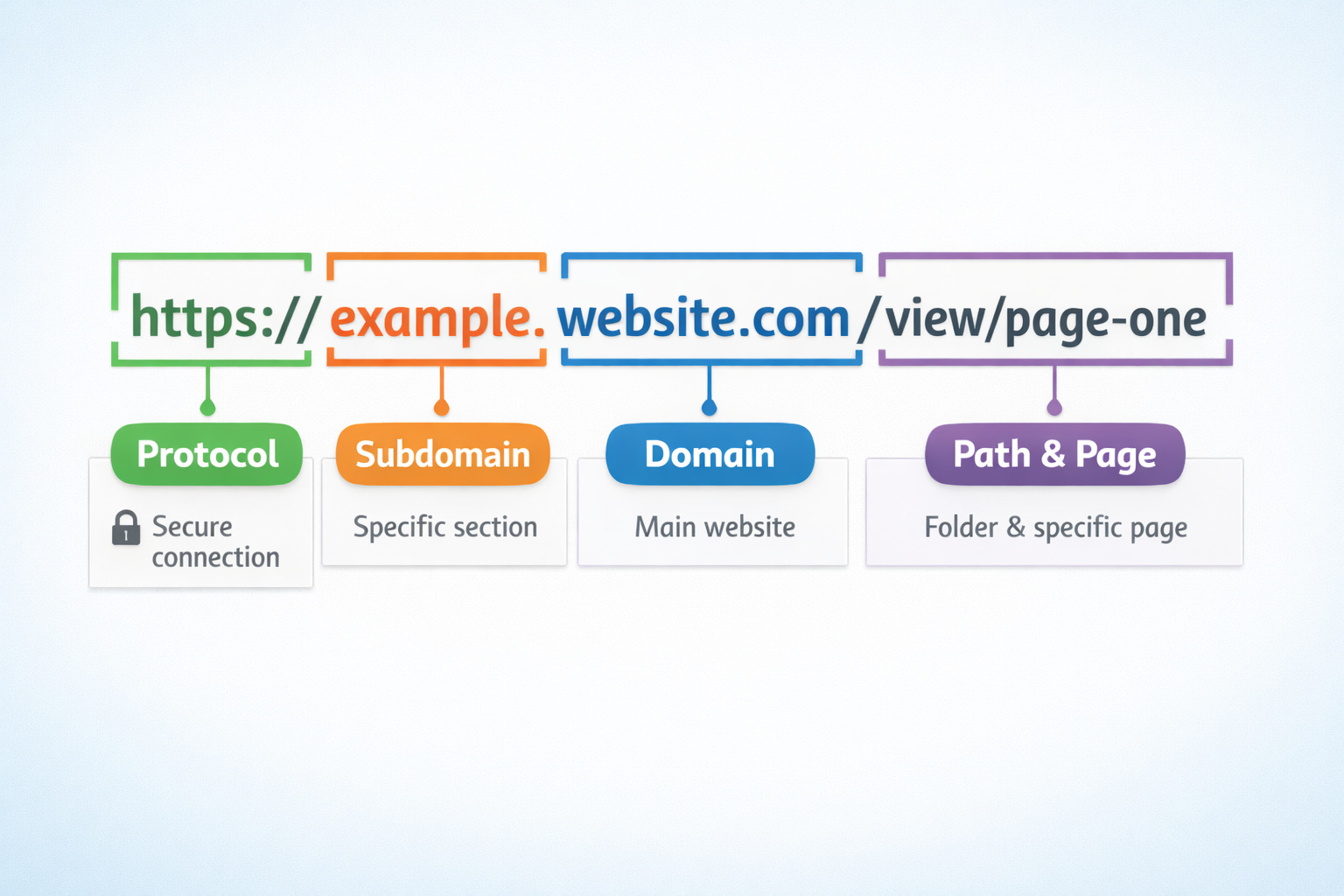
When validating what website we are on we want to look at the Domain section. Anything before this is a subsection of the main website. Anything after it is often perceived as noise that we ignore.
Let’s look at our “Booking.com” example again

We can see that the actual domain is “www-account-booking.com” and “account.booking.comんdetailんrestric-access” is the subdomain, but the Japanese character makes us thing anything after “booking.comん” is just path & page noise.
While web browsers, like Safari and Google Chrome, eventually block these malicious domains it’s an ongoing game of cat and mouse and there are always people who fall for newly minted scams.
We can protect ourselves by taking time to inspect the URL when our gut gives us pause and by using a Password Manager which will automatically identify the real domain.
Original story and example image from Bleeping Computer